Milestone 3
This page demonstrates the core capabilities of the Just the Docs theme, including navigation, mathematical typesetting, and technical diagrams.
Table of Contents
- Milestone 3
- Table of Contents
- Video Demonstration
- 1. PacManBot Abstract Diagram
- 2. Algorithm
- Low Level System Diagram
- rqt graph showing custom nodes
- rqt graph showing custom nodes with library nodes
- 2.1 Final Updated Module Declaration Table
- 2.2 Algorithm Logic and System Model
- Total Logic Summary: PacManBot Game Autonomy
- Algorithm 1: Pellet Generation and Removal
- Algorithm 2: Clyde Ghost Motion and Obstacle Publishing
- Algorithm 3: Clyde-Aware Pellet Selection
- Algorithm 4: Planner Execution and Replanning
- Algorithm 5: Game Controller State Machine
- Algorithm 6: Game Event Mapping
- Algorithm 7: Light Feedback
- Algorithm 8: Audio Feedback
- Algorithm 9: User Interface and Startup Support
- 2.3 Algorithm Summary
- 3. Benchmarking & Results
- 4.Ethical Impact Statement
- 5. Individual Technical Contributions
Video Demonstration
1. PacManBot Abstract Diagram
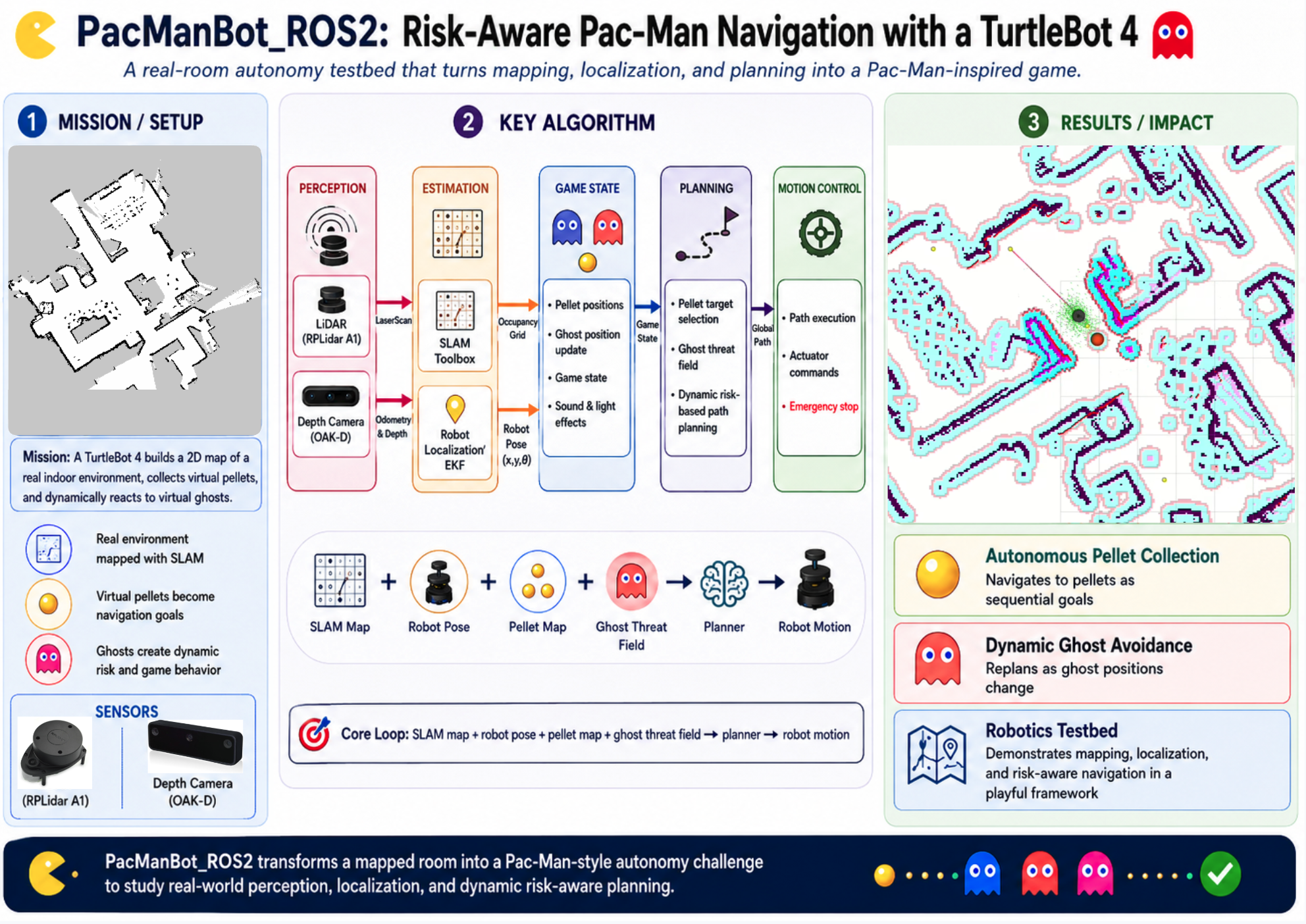 —
—
2. Algorithm
The core technical contribution of the PacManBot system is a custom game-state and decision-making layer built on top of the ROS 2 TurtleBot 4 and Nav2 navigation stack. Rather than replacing Nav2, the custom modules define the Pac-Man game behavior: pellet generation, pellet collection, Clyde ghost behavior, game-state transitions, scoring, sound feedback, light feedback, user interaction, and high-level goal selection.
This section first gives the final updated module declaration table, then presents the custom software logic using pseudocode-style algorithms. This format is used to make the system logic easier to follow while still including the key mathematical relationships used by the planner, pellet manager, Clyde node, and game controller.
Low Level System Diagram
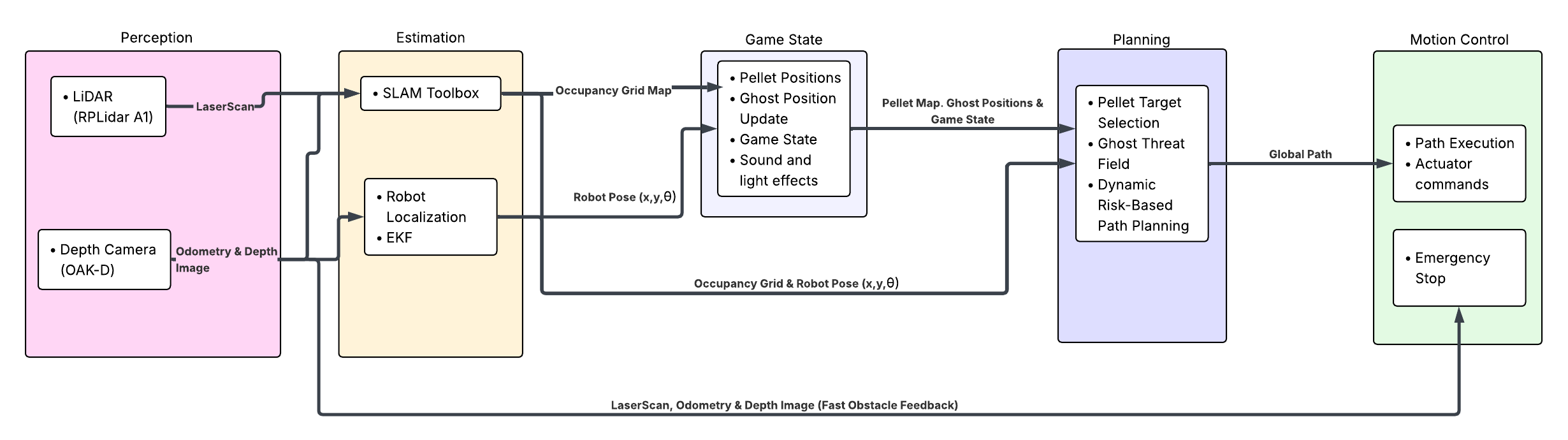
rqt graph showing custom nodes
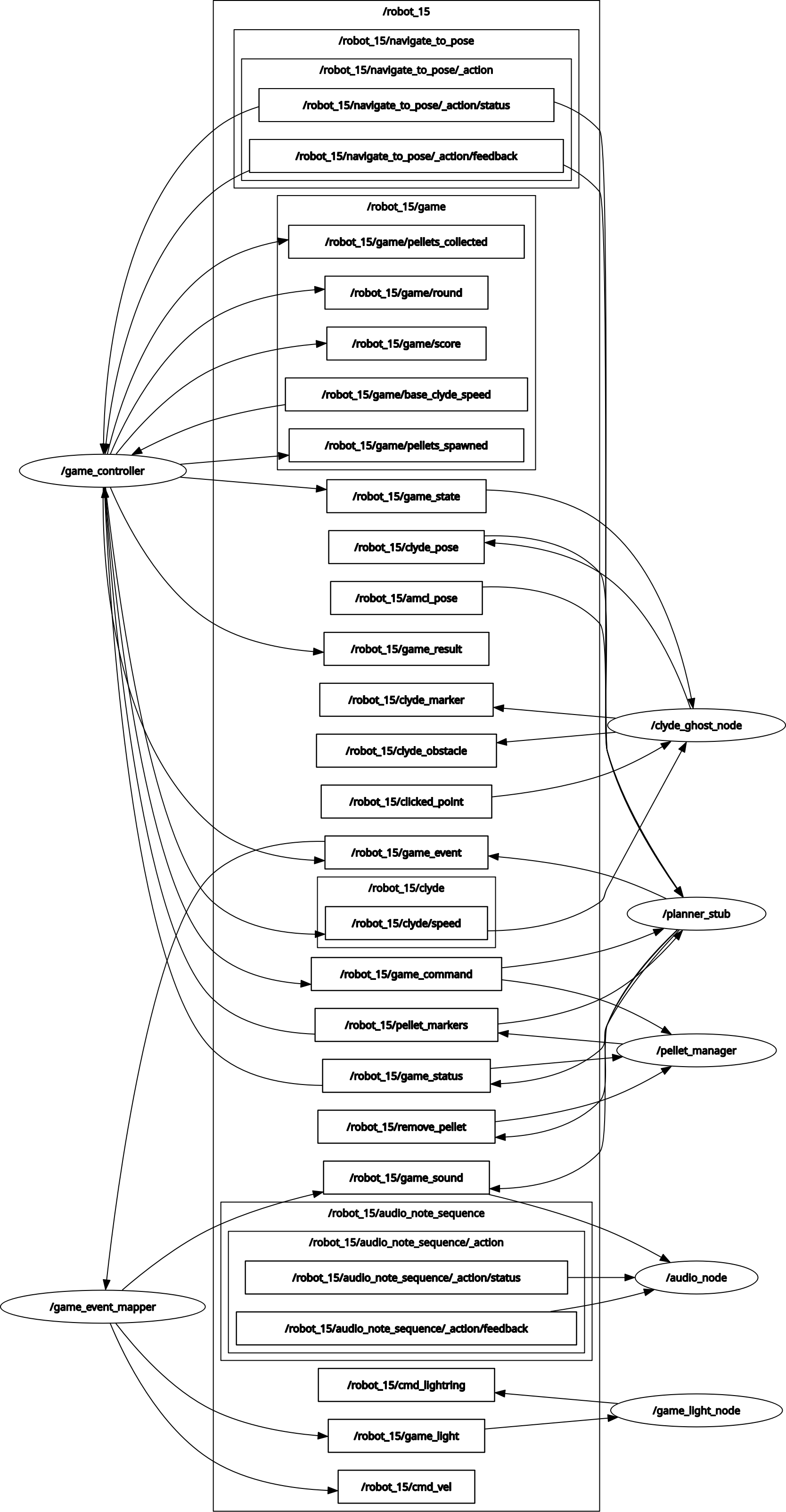
rqt graph showing custom nodes with library nodes
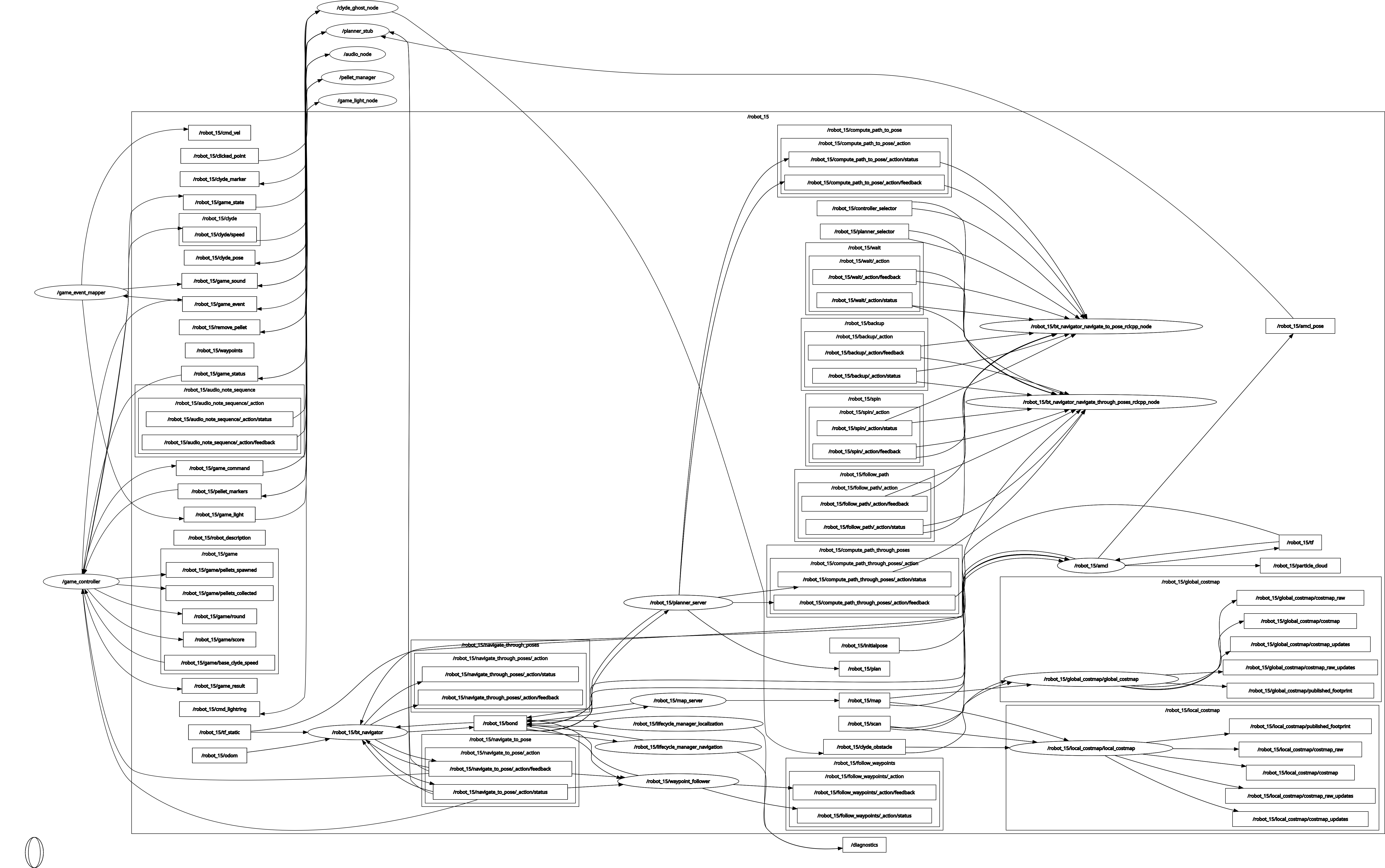
2.1 Final Updated Module Declaration Table
The PacManBot system uses both custom project modules and external ROS 2 library modules. Custom modules were developed specifically for the game logic, feedback system, pellet behavior, Clyde behavior, and game-state control. Library modules are provided by ROS 2, TurtleBot 4, Nav2, RViz, and sensor driver packages.
Compared to the previous milestone, the system has expanded beyond a basic pellet-navigation demo. The previous milestone listed /audio_node, /game_event_mapper, /game_light_node, /pellet_manager, and /planner_stub as the main custom project nodes, while ghost behavior and risk-reward planning were still listed as pending. The current implementation now includes additional custom modules such as /game_controller, /clyde_ghost_node, /wait_for_amcl_pose, /game_state_demo_gui, and a custom RViz plugin panel. The project has also progressed from simple nearest-pellet navigation into a more complete game architecture with Clyde-aware planning, game-state management, scoring, round progression, reset behavior, and user interface support.
| Module / Node | Functional Domain | Software Type | Description | Previous Milestone Status | Current Status | Change Since Previous Milestone |
|---|---|---|---|---|---|---|
| LiDAR Sensor / Oak-d RGBD Camera | Perception | Library / Driver | Provides LiDAR scan data used by AMCL and Nav2 costmaps. | Completed | Completed | Active perception sources for localization, mapping and navigation. |
| SLAM Toolbox | Mapping | Library | Used to build the saved occupancy grid map. | Completed | Completed | Runtime uses the saved map produced from SLAM. |
| Robot Localization | Localization | Library | Estimates robot pose on the saved map. | Completed | Completed | Still required for planner and game-state logic. |
Sound Effects / /audio_node | Game Feedback | Custom | Plays game sounds using Create 3 audio note sequences. | Completed | Completed | Still valid from previous milestone. |
Light Effects / /game_light_node | Game Feedback | Custom | Displays game states using the Create 3 lightring. | Completed | Completed | Still valid from previous milestone. |
Game Event Mapper / /game_event_mapper | Event Coordination | Custom | Maps high-level events to sound, light, and motion. | Completed | Completed | Still valid from previous milestone. |
Pellet Manager / /pellet_manager | Game World | Custom | Generates, publishes, removes, and resets pellets. | Completed baseline | Completed | Removal and reset behavior now clearly integrated. |
Planner Stub / /planner_stub | Strategic Planning | Custom | Selects pellet goals, sends Nav2 goals, handles collection and Clyde risk. | Completed baseline | Completed / Improved | Now includes Clyde-aware scoring, replanning, death detection, and return-home behavior. |
Ghost Path Behavior / /clyde_ghost_node | Game State | Custom | Moves Clyde through the map and publishes Clyde as a marker and obstacle. | Pending | Completed baseline | Major new module added. |
| Risk-Reward Robot Path Planning | Strategic Planning | Custom | Chooses pellets using distance, Clyde risk, and threat direction. | Pending | Completed baseline | Implemented as high-level pellet scoring plus Nav2 costmap avoidance. |
Game Controller / /game_controller | Game State | Custom | Manages menu, start, running, death, complete, score, round, and reset states. | Not listed | Completed baseline | New major module added. |
RViz Game Panel / pacmanbot_rviz_plugins | User Interface | Custom | Provides start/reset/status controls in RViz. | Not listed | Completed baseline | New interface module added. |
Demo GUI / /game_state_demo_gui | Testing / UI | Custom | Allows manual testing of game events, lights, and sounds. | Not listed | Completed demo tool | New support tool added. |
AMCL Wait Utility / /wait_for_amcl_pose | Startup Support | Custom | Waits for valid localization before game behavior begins. | Not listed | Completed | New startup reliability utility. |
Nav2 Custom Configuration / nav2_custom.yaml | Navigation Configuration | Library / Configured | Provides project-specific Nav2 tuning for planner, controller, costmaps, velocity smoothing, collision monitoring, and Clyde obstacle integration. | Basic Nav2 configuration | Completed / Tuned | Not a custom node, but updated to support game-speed navigation, tighter costmap inflation, and Clyde-aware obstacle avoidance through the local/global costmaps. |
Overall, the system has progressed from a functional navigation baseline into a playable game baseline. It can localize on a saved SLAM map, generate pellets in valid map space, visualize pellets in RViz, select pellet targets using Clyde-aware scoring, navigate using Nav2, remove collected pellets, track score, spawn and move Clyde, represent Clyde as a dynamic obstacle, detect Clyde collision, trigger sound and lighting effects, run start/death/win/reset sequences, return home after death or completion, and provide operator controls through GUI and RViz tools.
2.2 Algorithm Logic and System Model
The PacManBot system is modeled as a hybrid autonomy and game-control architecture. The custom modules define the Pac-Man game rules and high-level decision-making, while Nav2 provides lower-level path planning, controller execution, and costmap-based obstacle avoidance.
The system can be summarized by the following state representation:
State:
    xr(t) = robot pose from AMCL = [xr, yr, theta]
    xc(t) = Clyde pose = [xc, yc]
    P(t)  = set of remaining pellets
    G(t)  = current game state
    S(t)  = current score
    R(t)  = current round
The main game states are:
G(t) ∈ {MENU, RETURNING_HOME, STARTING, RUNNING, DYING, COMPLETE}
Each pellet is represented as:
pi = [xi, yi, id_i]
where (xi, yi) is the pellet position in the map frame and id_i is the marker identifier used for visualization and removal.
Total Logic Summary: PacManBot Game Autonomy
This summary describes the complete system-level behavior. It is not contained in one file; it is distributed across the game controller, planner, pellet manager, Clyde node, and feedback nodes.
Purpose: Coordinate the full game sequence from startup to gameplay, win, death, and reset.
Primary Source File: game_controller.py
Supporting Source Files: planner_stub.py, pellet_manager.py, clyde_ghost_node.py, game_event_mapper.py
| Item | Description |
|---|---|
| Inputs | Saved map, AMCL pose, pellet markers, Clyde pose, start/reset commands |
| Outputs | Game state, score, Nav2 goals, light events, sound events, reset commands |
| Main Responsibility | Coordinate the full PacManBot gameplay loop |
Total Logic Summary: PacManBot Game Autonomy

Require:
    Saved occupancy map M
    AMCL robot pose xr
    Clyde pose xc
    Pellet set P
    Game command input

Ensure:
    Robot navigates toward pellets
    Game state, score, Clyde behavior, lights, and audio are updated

1:  Load saved occupancy map M
2:  Initialize game state G <- MENU
3:  Wait until AMCL pose xr is available
4:  Generate pellet set P from valid map cells
5:  Initialize Clyde in valid map space

6:  while system is running do
7:      if start command received then
8:          Reset score, pellets, Clyde, and round variables
9:          Command robot to return home
10:         Trigger theatrical start event
11:         Enable planner autonomy
12:         Set G <- RUNNING
13:     end if

14:     while G = RUNNING do
15:         Update robot pose xr
16:         Update Clyde pose xc
17:         Update remaining pellet set P
18:         Publish Clyde as a dynamic obstacle
19:         Select best pellet using Clyde-aware scoring
20:         Send selected pellet to Nav2
21:         Monitor pellet collection
22:         Monitor Clyde collision

23:         if pellet collected then
24:             Remove pellet from P
25:             Increment score
26:             Publish pellet event
27:         end if

28:         if Clyde catches robot then
29:             Cancel Nav2 goal
30:             Disable autonomy
31:             Publish death event
32:             Set G <- DYING
33:         end if

34:         if all pellets collected then
35:             Disable autonomy
36:             Publish win event
37:             Set G <- COMPLETE
38:         end if
39:     end while

40:     if G = DYING or G = COMPLETE then
41:         Command robot to return home
42:         Wait for reset or next start command
43:     end if
44: end while
Algorithm 1: Pellet Generation and Removal
Custom Node: pellet_manager
Purpose: Convert the saved map into valid pellet locations and remove pellets when collected.
| Item | Description |
|---|---|
| Inputs | Occupancy map image, map resolution, map origin, remove/reset requests |
| Outputs | Pellet marker array, updated pellet set |
| Main Responsibility | Maintain the game-world pellet layout |
Algorithm 1: Pellet Generation and Removal

Require:
    Occupancy map image M
    Map resolution R
    Map origin (x0, y0)
    Free-space threshold Tf
    Pellet spacing s
    Wall-clearance radius rw

Ensure:
    Pellets are placed only in valid free-space map locations

1:  Load map YAML file
2:  Load occupancy map image M
3:  Read map resolution R and origin (x0, y0)
4:  Convert spacing s and clearance rw from meters to pixels
5:  Initialize empty pellet set P

6:  for each candidate pixel (u, v) sampled at spacing s do
7:      if M(u, v) <= Tf then
8:          Reject candidate
9:      else if candidate is too close to a wall then
10:         Reject candidate
11:     else
12:         Convert pixel (u, v) to world position (x, y)
13:         Assign pellet ID
14:         Add pellet to P
15:     end if
16: end for

17: Publish P as RViz marker array

18: while node is running do
19:     if remove_pellet message received then
20:         Remove pellet with matching ID from P
21:         Republish updated marker array
22:     end if

23:     if reset_pellets service called then
24:         Regenerate full pellet set P
25:         Republish marker array
26:     end if
27: end while
Key Map-to-Pellet Logic
A candidate pellet pixel is accepted only if it is in free space:
\[M(u,v) > T_f\]The pixel-to-world conversion is:
\[x = uR + x_0\] \[y = (H-v)R + y_0\]where \(R\) is the map resolution, \((x_0,y_0)\) is the map origin, and \(H\) is the map image height. The \((H-v)\) term flips image coordinates into the ROS map frame.
When a pellet is collected, the active pellet set is updated as:
\[P_{t+1} = P_t \setminus \{p_i\}\]where H is the map image height. The (H - v) term flips image coordinates into the ROS map frame because image coordinates increase downward while ROS map coordinates increase upward.
Algorithm 2: Clyde Ghost Motion and Obstacle Publishing
Custom Node: clyde_ghost_node
Purpose: Simulate Clyde as a moving ghost and publish him as both a game object and a dynamic obstacle.
| Item | Description |
|---|---|
| Inputs | Occupancy map, reset command, Clyde speed command |
| Outputs | Clyde pose, Clyde marker, Clyde obstacle cloud |
| Main Responsibility | Move Clyde through valid map space and inject him into Nav2 costmaps |
Algorithm 2: Clyde Ghost Motion and Obstacle Publishing

Require:
    Occupancy map M
    Free-space threshold Tf
    Wall-clearance radius rw
    Clyde speed vc

Ensure:
    Clyde moves through valid map space and appears as a dynamic obstacle

1:  Load occupancy map M
2:  Build valid free-space mask
3:  Reject cells too close to walls
4:  Select valid spawn cell for Clyde
5:  Select valid target cell for Clyde
6:  Plan or choose path through valid cells

7:  while node is running do
8:      if reset_clyde command received then
9:          Select new valid spawn cell
10:         Select new valid target cell
11:     end if

12:     if speed command received then
13:         Update Clyde speed vc
14:     end if

15:     Move Clyde toward current target

16:     if Clyde reaches target then
17:         Select a new valid target cell
18:     end if

19:     Publish Clyde pose
20:     Publish Clyde RViz marker
21:     Publish Clyde obstacle cloud for Nav2 costmap
22: end while
Clyde Prediction and Costmap Logic
Clyde’s simplified motion update can be written as:
\[\mathbf{x}_c(t+\Delta t) = \mathbf{x}_c(t) + v_c \Delta t \frac{ \mathbf{x}_{goal} - \mathbf{x}_c(t) }{ \|\mathbf{x}_{goal} - \mathbf{x}_c(t)\| }\]Clyde is also represented in the navigation costmap as a local obstacle region:
\[C_{\mathrm{clyde}}(t) = \left\{ (x,y): \sqrt{(x-x_c(t))^2+(y-y_c(t))^2} \leq r_c \right\}\]The active navigation costmap can therefore be summarized as:
\[C(t) = C_{\mathrm{static}} \cup C_{\mathrm{sensor}}(t) \cup C_{\mathrm{clyde}}(t)\]Clyde affects the robot in two ways. First, the custom planner uses Clyde’s pose to score risky pellets. Second, Nav2 uses Clyde’s obstacle cloud in the local costmap so the robot can avoid Clyde during motion execution.
Algorithm 3: Clyde-Aware Pellet Selection
Custom Node: planner_stub
Purpose: Select the best pellet target using robot distance, Clyde proximity, and Clyde threat direction.
| Item | Description |
|---|---|
| Inputs | Robot pose, Clyde pose, pellet set, game command |
| Outputs | Selected pellet goal, Nav2 action goal |
| Main Responsibility | Choose the safest and most useful pellet goal |
Algorithm 3: Clyde-Aware Pellet Selection

Require:
    Robot pose xr = (xr, yr)
    Clyde pose xc = (xc, yc)
    Remaining pellet set P
    Ghost risk radius rg
    Ghost risk weight wg
    Direction penalty weight wd

Ensure:
    A pellet goal is selected using distance and Clyde risk

1:  best_pellet <- None
2:  best_score <- infinity

3:  for each pellet pi in P do
4:      dr <- sqrt((pi.x - xr.x)^2 + (pi.y - xr.y)^2)
5:      dc <- sqrt((pi.x - xc.x)^2 + (pi.y - xc.y)^2)

6:      if dc < rg then
7:          clyde_risk <- (rg - dc) * wg
8:      else
9:          clyde_risk <- 0
10:     end if

11:     direction_penalty <- 0

12:     if Clyde is threatening robot then
13:         robot_to_clyde <- xc - xr
14:         robot_to_pellet <- pi - xr
15:         alignment <- dot(robot_to_clyde, robot_to_pellet)

16:         if alignment > 0 then
17:             direction_penalty <- wd * (1 + alignment)
18:         end if
19:     end if

20:     score <- dr + clyde_risk + direction_penalty

21:     if score < best_score then
22:         best_score <- score
23:         best_pellet <- pi
24:     end if
25: end for

26: return best_pellet
Clyde-Aware Scoring and Escape Logic
For each pellet \(p_i=(x_i,y_i)\), the robot-to-pellet distance is:
\[d_r(p_i) = \sqrt{(x_i-x_r)^2+(y_i-y_r)^2}\]The Clyde-to-pellet distance is:
\[d_c(p_i) = \sqrt{(x_i-x_c)^2+(y_i-y_c)^2}\]The Clyde risk penalty is:
\[R_c(p_i) = \max(0,\ r_g-d_c(p_i))w_g\]Clyde’s closing speed is estimated using the previous and current robot-Clyde distances:
\[v_{\mathrm{close}}(t) = \frac{d_{rc}(t-\Delta t)-d_{rc}(t)}{\Delta t}\]The final pellet score is:
\[J(p_i) = d_r(p_i) + R_c(p_i) + D(p_i)\]The selected pellet is:
\[p^* = \arg\min_{p_i \in P_t} J(p_i)\]Here, \(D(p_i)\) is the escape-direction penalty. It increases the score of pellets that lie in Clyde’s direction when Clyde is close or approaching. This causes the robot to prefer pellets that move it away from danger.
Algorithm 4: Planner Execution and Replanning
Custom Node: planner_stub
Related Configuration: nav2_custom.yaml
Purpose: Send pellet goals to Nav2, monitor progress, remove pellets, detect death, and replan when needed.
| Item | Description |
|---|---|
| Inputs | AMCL pose, pellet markers, Clyde pose, game commands |
| Outputs | Nav2 goals, remove-pellet commands, game status messages |
| Main Responsibility | Execute strategic goals through Nav2 and monitor game conditions |
Algorithm 4: Planner Execution and Replanning

Require:
    AMCL pose xr
    Pellet set P
    Clyde pose xc
    Game command stream
    Replan margin m
    Pellet pickup radius rp
    Clyde death radius rdeath

Ensure:
    Robot pursues pellets while avoiding unsafe game states

1:  Wait for AMCL pose
2:  Save first valid AMCL pose as home pose
3:  Wait until game command is ENABLE

4:  while planner is enabled do
5:      Update robot pose xr
6:      Update pellet set P
7:      Update Clyde pose xc

8:      if no active Nav2 goal then
9:          target <- Clyde-Aware Pellet Selection(P, xr, xc)
10:         Send target to Nav2
11:     end if

12:     if a better pellet exists by margin m then
13:         Cancel current Nav2 goal
14:         Select new pellet target
15:         Send new target to Nav2
16:     end if

17:     for each pellet pi in P do
18:         if distance(robot, pi) <= rp then
19:             Publish remove_pellet(pi.id)
20:             Publish pellet_collected status
21:         end if
22:     end for

23:     if distance(robot, Clyde) <= rdeath then
24:         Cancel current Nav2 goal
25:         Disable planner
26:         Publish clyde_killed status
27:     end if

28:     if P is empty then
29:         Publish game_complete status
30:         Disable planner
31:     end if
32: end while
Replanning, Collection, and Death Conditions
After the planner selects a target pellet, that pellet becomes the Nav2 goal:
\[g_t = p^*\]The planner only switches goals when the new target is better by at least the replan margin:
\[J(p_{\mathrm{new}}) + m < J(p_{\mathrm{current}})\]A pellet is collected when the robot enters the pickup radius:
\[d_r(p_i) \leq r_p\]The robot is caught by Clyde when:
\[d_{\mathrm{death}}(t) = \sqrt{(x_r(t)-x_c(t))^2+(y_r(t)-y_c(t))^2} \leq r_{\mathrm{death}}\]Algorithm 5: Game Controller State Machine
Custom Node: game_controller
Purpose: Manage the full game state, including menu, start, running, death, completion, score, and round behavior.
| Item | Description |
|---|---|
| Inputs | Start/reset services, game status messages, pellet markers |
| Outputs | Game commands, game state, score, round, Clyde speed, game events |
| Main Responsibility | Coordinate high-level game state transitions |
Algorithm 5: Game Controller State Machine

Require:
    Start service
    Reset service
    Planner game_status messages
    Pellet marker count
    Base Clyde speed
    Round speed increment

Ensure:
    Game state and score remain consistent across the full game loop

1:  G <- MENU
2:  score <- 0
3:  round <- 1
4:  pellets_collected <- 0

5:  while game_controller is running do
6:      if start service called then
7:          score <- 0
8:          pellets_collected <- 0
9:          Publish game_command RETURN_HOME
10:         Publish game_event START_THEATRICAL
11:         Publish Clyde speed for current round
12:         Publish game_command ENABLE
13:         G <- RUNNING
14:     end if

15:     if reset service called then
16:         Publish game_command DISABLE
17:         Reset pellets
18:         Reset Clyde
19:         score <- 0
20:         pellets_collected <- 0
21:         G <- MENU
22:     end if

23:     if game_status = PELLET_COLLECTED then
24:         pellets_collected <- pellets_collected + 1
25:         score <- score + 1
26:         Publish score
27:         Publish game_event PELLET
28:     end if

29:     if game_status = GAME_COMPLETE then
30:         Publish game_command DISABLE
31:         Publish game_event WIN
32:         G <- COMPLETE
33:         Publish game_command RETURN_HOME
34:     end if

35:     if game_status = CLYDE_KILLED then
36:         Publish game_command DISABLE
37:         Publish game_event DEATH
38:         G <- DYING
39:         Publish game_command RETURN_HOME
40:     end if
41: end while
Game State and Score Update Logic
The score is updated when a pellet is collected. The collected pellet count is updated as:
\[N_{\mathrm{collected}}(t+1) = N_{\mathrm{collected}}(t)+1\]The round is complete when all spawned pellets have been collected:
\[N_{\mathrm{collected}}(t) \geq N_{\mathrm{spawned}}\]Clyde’s speed increases by round:
\[v_c(R_t) = v_{\mathrm{base}} + (R_t-1)v_{\mathrm{step}}\]Algorithm 6: Game Event Mapping
Custom Node: game_event_mapper
Purpose: Convert abstract game events into light commands, sound commands, and optional robot motion effects.
| Item | Description |
|---|---|
| Inputs | Game event string |
| Outputs | Game light command, game sound command, optional cmd_vel |
| Main Responsibility | Translate game events into physical robot feedback |
Algorithm 6: Game Event Mapping

Require:
    Game event e

Ensure:
    Each game event produces the correct robot feedback behavior

1:  Receive game event e

2:  if e = START_THEATRICAL then
3:      Publish light command START
4:      Publish sound command PACMAN_THEME
5:      Execute timed spin motion

6:  else if e = PELLET then
7:      Publish light command PELLET
8:      Publish sound command PELLET

9:  else if e = POWER_PELLET then
10:     Publish light command POWER_PELLET
11:     Publish sound command POWERUP

12: else if e = DEATH or e = GAME_OVER then
13:     Publish light command GAME_OVER
14:     Publish sound command DEATH
15:     Execute timed shake motion

16: else if e = WIN then
17:     Publish light command WIN
18:     Publish sound command WIN

19: else if e = RESET then
20:     Publish light command OFF
21:     Publish zero velocity command
22: end if
The event mapping can be summarized as:
game_event -> (light_command, sound_command, optional_motion)
Examples:
PELLET            -> (PELLET_LIGHT, PELLET_SOUND, none)
DEATH             -> (GAME_OVER_LIGHT, DEATH_SOUND, SHAKE_MOTION)
START_THEATRICAL  -> (START_LIGHTS, THEME_SOUND, SPIN_MOTION)
Algorithm 7: Light Feedback
Custom Node: game_light_node
Purpose: Convert light commands into Create 3 lightring colors and animations.
| Item | Description |
|---|---|
| Inputs | Light command string |
| Outputs | Create 3 cmd_lightring messages |
| Main Responsibility | Provide visual feedback for game state and events |
Algorithm 7: Light Feedback

Require:
    Light command L

Ensure:
    Robot lightring displays the current game state

1:  Receive light command L
2:  Stop active animation if command overrides it

3:  if L is a static color command then
4:      Set all LEDs to requested RGB color
5:      Publish lightring message

6:  else if L is an animated command then
7:      Select animation frame sequence
8:      while animation is active do
9:          Publish next LED frame
10:         Wait for timer callback
11:     end while

12: else if L = OFF then
13:     Set all LEDs to black
14:     Publish lightring message
15: end if
Lightring State Logic
The Create 3 lightring is modeled as a six-LED state vector:
\[\Lambda(t) = [\ell_1,\ell_2,\ell_3,\ell_4,\ell_5,\ell_6]\]Each LED stores an RGB command:
\[\ell_i = [R_i,\ G_i,\ B_i]\]For static colors, the same RGB command is applied to all six LEDs:
\[\Lambda(t) = [\ell,\ell,\ell,\ell,\ell,\ell]\]For static colors:
Lambda(t) = same RGB value for all six LEDs
For animations:
Lambda(t) = current frame from selected animation sequence
Algorithm 8: Audio Feedback
Custom Node: audio_node
Supporting File: audio_library.py
Purpose: Convert game sound commands into Create 3 note sequences.
| Item | Description |
|---|---|
| Inputs | Sound command string |
| Outputs | Create 3 audio_note_sequence action goal |
| Main Responsibility | Provide audio feedback for game events |
Algorithm 8: Audio Feedback

Require:
    Sound command A
    Audio library mapping sound names to MIDI note sequences

Ensure:
    Robot plays the requested game sound effect

1:  Receive sound command A

2:  if audio node is busy then
3:      Ignore command or wait until current sequence completes
4:  end if

5:  Look up MIDI note sequence for A

6:  for each note in sequence do
7:      Convert MIDI note to frequency
8:      Convert duration to ROS duration field
9:      Append note to AudioNoteSequence
10: end for

11: Send AudioNoteSequence action goal to Create 3
12: Set busy flag while sound is playing
13: Clear busy flag after playback finishes
Audio Frequency Conversion
The MIDI-to-frequency conversion is:
\[f(m) = 440 \cdot 2^{\frac{m-69}{12}}\]where \(m\) is the MIDI note number.
Algorithm 9: User Interface and Startup Support
Custom Nodes: game_state_demo_gui, pacmanbot_rviz_plugins, wait_for_amcl_pose
Purpose: Support manual testing, RViz-based game control, and startup synchronization.
| Item | Description |
|---|---|
| Inputs | User button input, AMCL pose stream |
| Outputs | Start/reset service calls, manual game events, startup readiness |
| Main Responsibility | Provide operator control and prevent gameplay before localization is ready |
Algorithm 9: User Interface and Startup Support

Require:
    User button input
    AMCL pose stream

Ensure:
    Game commands are only used after localization is available

1:  wait_for_amcl_pose subscribes to AMCL pose

2:  while no AMCL pose has been received do
3:      Keep waiting
4:  end while

5:  Mark localization as ready

6:  if user presses RViz Start button then
7:      Call game/start service
8:  end if

9:  if user presses RViz Reset button then
10:     Call game/reset service
11: end if

12: if user presses demo GUI event button then
13:     Publish selected game_event, game_light, or game_sound command
14: end if
2.3 Algorithm Summary
Together, these algorithms define the custom PacManBot behavior. The pellet_manager creates the game objectives, clyde_ghost_node creates a moving ghost and obstacle, planner_stub selects strategic pellet targets, game_controller manages score and state transitions, and the feedback nodes translate game events into lights, sound, and motion.
The system is therefore a layered autonomy design, mimicking an augmented reality video game. Nav2 still performs the low-level navigation and obstacle avoidance, while the custom modules implement the Pac-Man game rules and high-level decision-making.
3. Benchmarking & Results
The sidebar will automatically highlight the section you are currently viewing.
3.1 Observations of Pacman Success
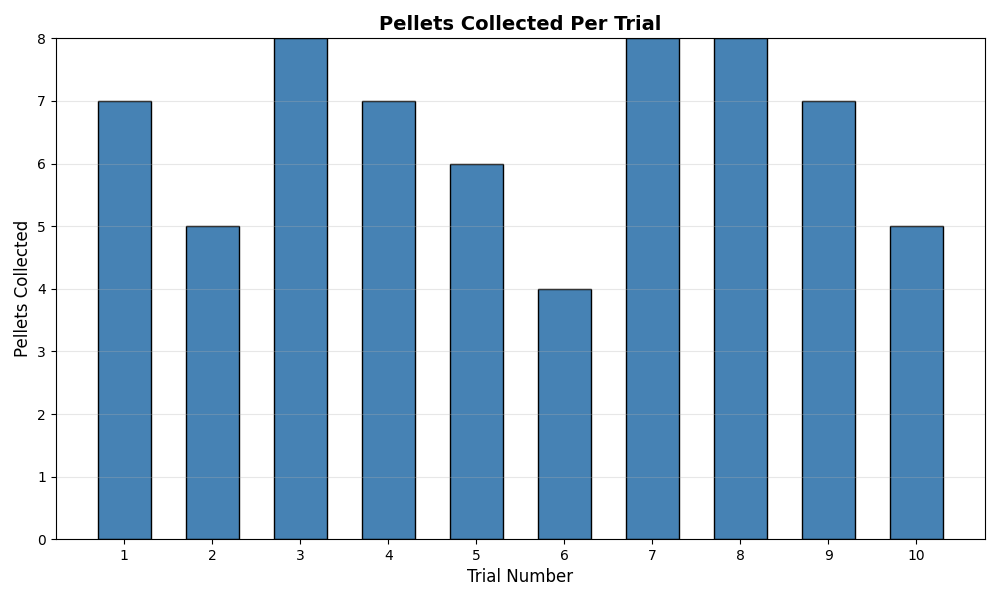
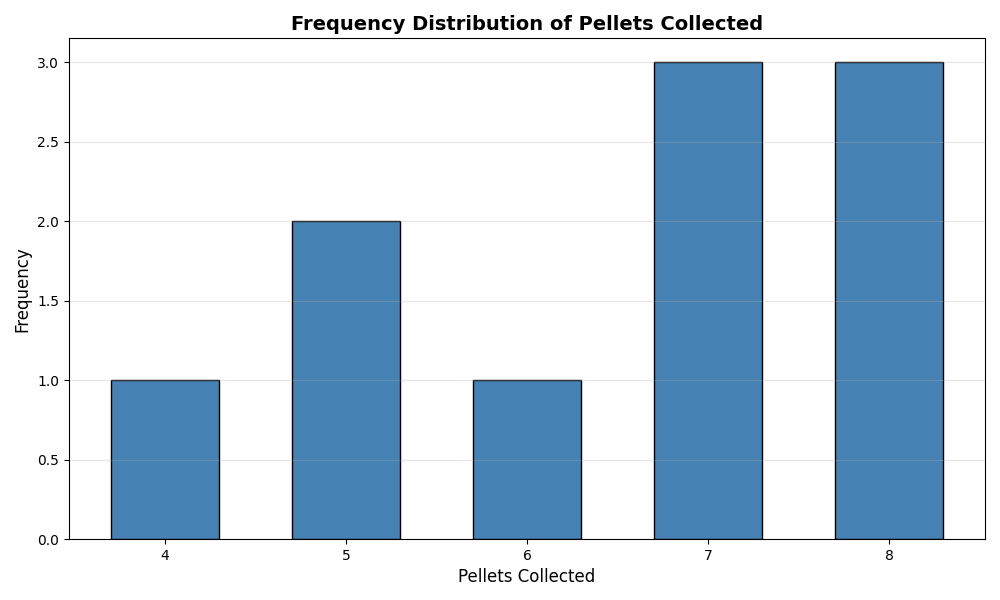
We wanted to evaluate the rate of success of the first round of the Pacman game under round 1 conditions. This data was a simple log of how many pellets were collected for each trial. This was to evaluate the escape and pathing behavior of pacman for 1 Ghost (Clyde).
3.2 Conclusion
Under the baseline conditions for Clydes speed (0.25m/s), which is initialized for round 1, Pacman was able to complete the first round 30% of the time. However this rate of success can be improved given the qualitative notes that were taken during these trials. 30% of the trials only collected 7 pellets as the final pellet was located very far away from the robots starting position. Additionally, it seems like the last pellet was located in an area of the house that could easily be “Puppy Guarded” by Clyde. An image below shows this foul play.
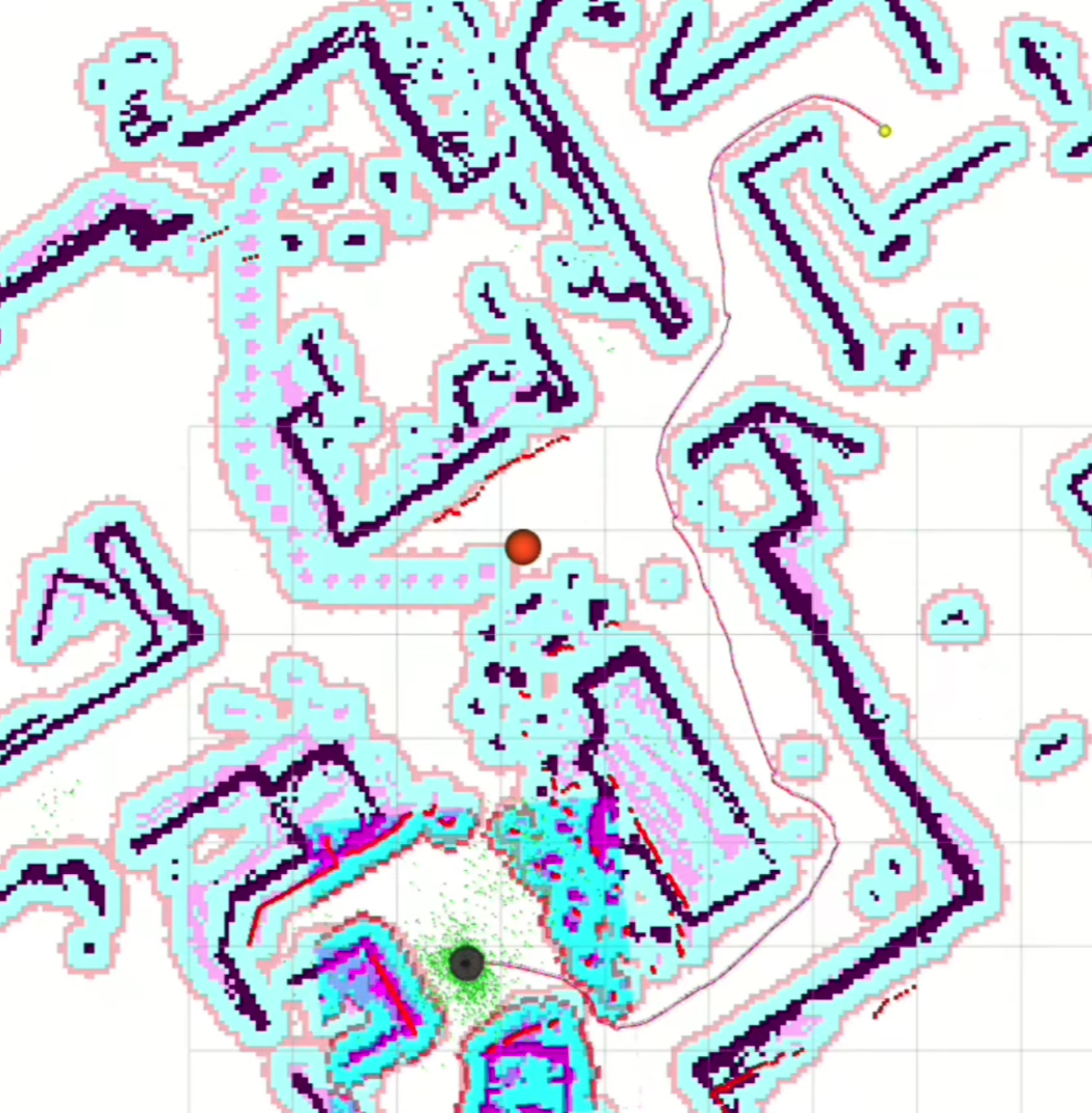
This made the reliability of the custom Ghost-Aware path planning algorithm faulty. However if we exclude the last pellet collection, the path planning success rate jumps to 60%.
4.Ethical Impact Statement
Privacy and Data Handling
PacManBot uses ROS 2 topics, localization data, map files, and logged robot data to operate and evaluate performance. In this implementation, the main privacy concern is not facial recognition, but the storage of indoor environment information through maps, AMCL pose logs, trajectory logs, and demo recordings. The map used for navigation may reveal the layout of an indoor space, and ROS logs may record where the TurtleBot 4 moved during testing. Future versions that add cameras or cloud connectivity would increase privacy risk and should include data minimization, local-only processing, restricted access to logs, and blurring/anonymization for any recorded video.
Bias and Hardware Limitations
PacManBot depends heavily on TurtleBot 4 localization, LiDAR sensing, maps, and Nav2 navigation. This creates hardware-related bias because the robot may perform well in clear, mapped environments but poorly around glass, reflective surfaces, clutter, narrow passages, or areas where LiDAR returns are unreliable. AMCL localization may also become inaccurate if the map does not match the real environment. This means the robot’s performance is not equally reliable in all spaces.
Safety and Kinetic Energy Management
PacManBot moves autonomously using the TurtleBot 4 platform, ROS 2 Nav2, AMCL localization, and goal commands from the planner node. The main safety risk is unintended robot motion, such as navigating toward an incorrect pellet goal, localization drift, delayed stopping, or collision with walls, objects, or nearby users. The package also includes event-based motion in game_event_mapper.py, such as spinning or shaking during start/death events, so these motions should remain slow and time-limited. The project primarily relies on TurtleBot 4 navigation and Nav2 path planning to generate controlled robot movement rather than directly commanding unrestricted motion. The system sends navigation goals through ROS 2 action interfaces, allowing the Nav2 stack to manage path execution and obstacle-aware navigation. Additionally, custom game-event motion behaviors were designed with safety considerations in mind, avoiding forward linear motion during spin and animation sequences to reduce the likelihood of unintended impacts with nearby objects or users. Stop commands are also published during reset and shutdown operations to ensure the robot safely halts movement when behaviors complete.
Bias and Hardware Limitations
PacManBot depends heavily on TurtleBot 4 localization, LiDAR sensing, maps, and Nav2 navigation. This creates hardware-related bias because the robot may perform well in clear, mapped environments but poorly around glass, reflective surfaces, clutter, narrow passages, or areas where LiDAR returns are unreliable. AMCL localization may also become inaccurate if the map does not match the real environment. This means the robot’s performance is not equally reliable in all spaces.
Utilitarian Test
From a utilitarian perspective, PacManBot is ethically justified because it provides educational value in ROS 2, Nav2, localization, autonomous planning, and human-robot interaction. However, these benefits only outweigh the risks if the system is tested safely, robot speed is controlled, and collected data is handled responsibly. In the scenario where there is no oversight with testing, it would fail the utilitarian test since the potential exposure of people/places would be detrimental.
Justice Test
From a justice perspective, the robot should operate reliably across different indoor environments. Since LiDAR, AMCL, and maps can fail under certain conditions, the system may be less reliable in spaces with glass, reflective objects, or poor map quality. Future work should improve robustness through better testing, sensor fusion, and clearer documentation of limitations. Based on the potential inconsistency in certain environmental conditions, it would mostly fail this test.
Virtue Test
From a virtue ethics perspective, the engineers should be honest about what the robot can and cannot do. For this project, that means clearly reporting Nav2 failures, localization drift, pellet-planning limitations, and safety risks instead of overstating performance. Responsible engineers should prioritize safe testing, transparent results, and continuous improvement. Since testing used LiDAR obstacle detection, reactive navigation, controlled robot movement, and indoor testing, it would pass the virtue test.
5. Individual Technical Contributions
The table below documents each team member’s primary technical role, representative Git commits, and directly authored or primarily maintained files. This section connects each contributor to concrete implementation work in the repository.
The table below documents each team member’s primary technical role, representative Git commits, and directly authored or primarily maintained files. This section connects each contributor to concrete implementation work in the repository.
| Team Member | Primary Technical Role (PTR) | Key Git Commits / PRs | Specific File(s) Authorship (Direct Links) |
|---|---|---|---|
| Sean Vellequette | System Integration, Audio Systems & Startup Support | 6bbc8db, 8f1803e | PacManBot.rviz, audio_library.py, audio_node.py, wait_for_amcl_pose.py |
| Gabriel Sandys | Autonomous Planning, Clyde Behavior & Navigation Integration | 36a52a3, a70386d, 65a8745 | clyde_ghost_node.py, game_light_node.py, pellet_manager.py, planner_stub.py, launch files, game_state_demo_gui.py (secondary owner) |
| Abdirahman Aden | Game Event Logic, Game Controller & GUI Integration | 72e47dd, c483625 | game_controller.py, game_event_mapper.py, game_state_demo_gui.py (primary owner) |